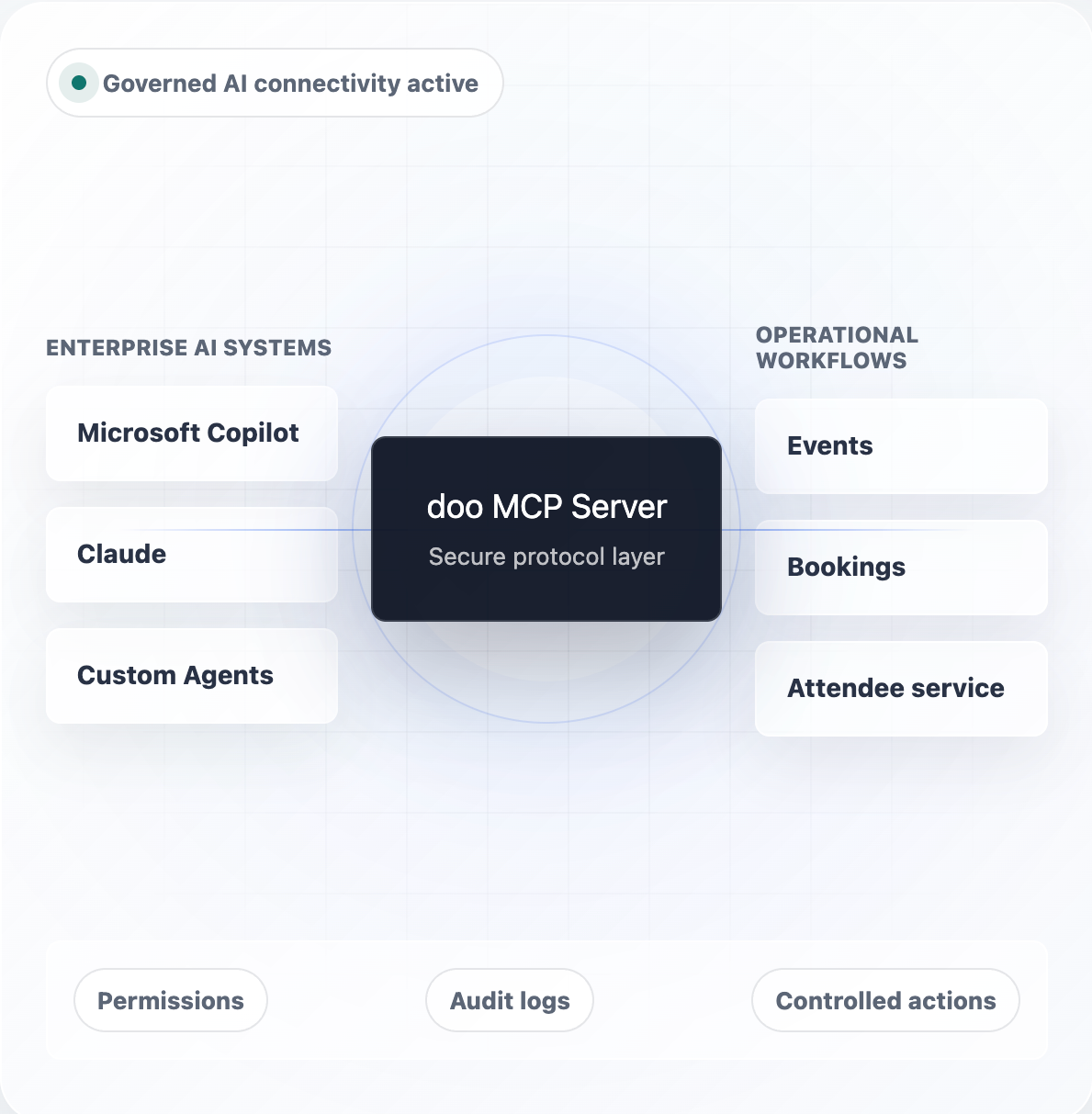
AI enablement for event operations
AI-powered Event Management with doo
Manage events, bookings, attendees, and reporting simply by talking to your existing AI.Connect Microsoft Copilot, Claude, or other enterprise AI systems to doo through the MCP Server and turn conversations into real event operations.
Work faster. Reduce effort. Deliver better event experiences.
AI inside real operations
Your AI infrastructure already exists.
Now let it understand your events.
Organizations are already investing in approved enterprise AI systems. doo lets you extend those existing tools into event management. The result is a familiar AI experience that can retrieve information, perform approved actions, and support your event operations.
01
Work with AI You Already Use
No additional AI platform to learn or manage.
02
Turn Conversations into Actions
Create events, manage bookings, and update attendee data using natural language.
03
Connect Event Operations
Bring events, registrations, attendees, and reporting into your enterprise AI ecosystem.
04
Stay Secure
Every action follows existing permissions, governance, and compliance rules.
One intelligent platform for connected event operations.
MCP FOUNDATION
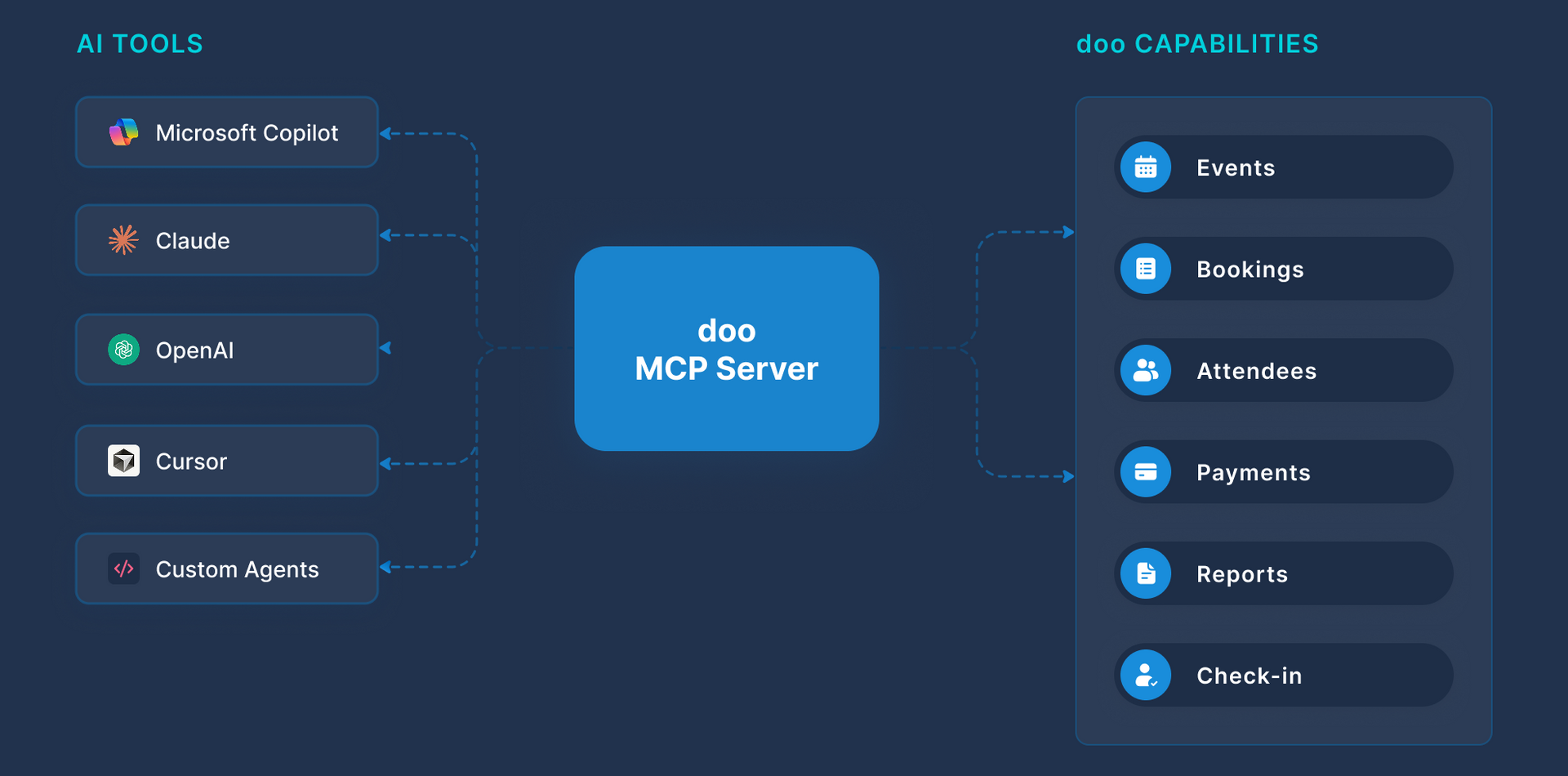
One secure connection between AI and your event platform
CONNECT
Connect Microsoft Copilot, Claude, or custom AI agents through a secure MCP interface.
ACCESS
Securely access events, bookings, attendees, reporting, and operational data while respecting existing permissions.
ACT
Create events, manage bookings, update attendee information, and automate approved workflows using natural language.
Why MCP matters
No custom AI integrations required
AI interactions remain governed and traceable
Operational workflows stay secure and permission-based
AI becomes actionable instead of purely informational
Resources
How to connect Copilot to doo
MCP setup documentation
AI Agent implementation examples
One secure connection between enterprise AI and event operations.
DOO AI AGENTS FRAMEWORK
Agent use cases for every stage of the event journey
Based on the doo AI framework, configure agents that can securely interact with operational event processes.
Operational event management
For Organizers
AI-powered operational event management.
Use doo through enterprise AI tools like Copilot or Claude
Create events from approved templates
Update attendee and booking information
Retrieve reporting and live event status
Access payments and check-in information
Coordinate event setup activities
Trigger approved workflows
Control permissions, actions, and data access at all times
Your operational event assistant.
Attendee self-service
For Attendees
AI-powered attendee self-service.
Embedded in event website chatbots
Answer booking and event questions
Retrieve booking and event information
Update attendee or booking data
Modify bookings where permitted
Provide 24/7 support without contacting the organizer
Seamless self-service for modern attendee experiences.
DOO AI IN ACTION
What your AI can do today
Explore real examples of how AI agents interact with doo through the doo MCP to manage events, registrations, attendees, and more.
Event Management
Registration
Attendee Management
On-site
Contact Management
Reporting
PROMPT
“Create a new webinar: Date: 21.11.2026. Speaker: Markus Schmitt. Title: How to Use AI in event marketing”
Backstage
Finds existing template for webinars
Creates a new event draft
Enters desired data
RESULT
Event draft can be reviewed, adjusted and published.
PROMPT
"Cancel our October AI congress, cancel all its bookings and create a new event for 15th November, 2026."
Backstage
Finds event
Cancels event
Identifies related bookings and cancels them
Copies event
Creates new event draft applying the new date
RESULT
Event created and ready for review or further configurations.
PROMPT
"Can you give me a list of upcoming events that are already sold out?"
Backstage
List events where number of available tickets is 0
RESULT
Filter events beyond the capabilities of the filter options in the event overview
PROMPT
“Add Manuel Klein as VIP to our Partner Dinner - email address: manuel.klein@email.com, pre-payment via invoice"
BACKSTAGE
Finds event
Adds booking to the new event using the provided data
RESULT
Attendee is added and receives a booking confirmation.
PROMPT
“Move all attendees from last week's webinar as attendees to the webinar next month”
BACKSTAGE
Finds past event
Identifies active registrations for past event
Adds attendees to the new event using the same data
RESULT
Attendees are added to the follow-up webinar automatically.
PROMPT
“Are there any new press registrations pending approval? If so, show the registration details and uploaded identification documents.”
BACKSTAGE
Searches for pending press registrations
Retrieves registration and attendee information
Approves or declines registrations upon user request
RESULT
Pending press registrations are identified, reviewed, and approved.
PROMPT
“Please process cancellation request from Peter Klein for the AI Congress and prepare the refund request for doo and a reply to the booker.”
BACKSTAGE
Validates registration and payment status
Cancels the booking
Prepares communication towards doo and the booker
RESULT
Cancellation process is completed efficiently and related communication is prepared.
PROMPT
“Generate a catering overview for the upcoming conference, summarizing attendee dietary preferences, allergies, and special meal requirements.”
BACKSTAGE
Finds event
Filters attendee data
Creates an individual list according to the requirements
RESULT
Catering-specific attendee list is generated.
PROMPT
"Has John Doo already checked in for the Marketing Congress today? Which sessions has he booked?"
BACKSTAGE
Gets attendee John Doo
Checks attendee status
Lists products of the attendee
RESULT
Quick information on site without searching/clicking through the doo Manager App.
PROMPT
“Prepare a contact list for a mailing to all checked-in attendees of our congress.”
BACKSTAGE
Creates a new contact group
Finds event
Identifies attendees who checked-in
Adds the related contacts to the group
RESULT
Contact list is ready to be used as recipients for an email campaign.
PROMPT
"Analyze event attendance within the past 6 months, identify repeated no-shows and assign them to a new contact group."
BACKSTAGE
Analyzes event attendance based on the doo check-in data, identify repeated no-shows, and adds them to a dedicated "No-Show" contact group.
RESULT
No-show statistics and attendance insights are generated, a no-show contact group is created.
PROMPT
"Analyze our past events and recommend optimization opportunities for future events by target groups and attendee types."
BACKSTAGE
Analyzes event and attendee data to identify high-performing audiences, event formats, and attendee patterns, and generate recommendations for future event planning, marketing, and attendee engagement.
RESULT
Actionable recommendations for improving future events are provided.
DOO AI IN ACTION
AI becomes more powerful when systems work together
By combining doo with calendars, CRM systems, reporting platforms, and collaboration tools, AI can automate complete event workflows across your organization.
Plan & Create
An AI agent accesses Outlook calendars, checks speaker availability, suggests suitable dates, retrieves attendee data from CRM systems, and creates the event in doo with all relevant information.
Systems involved:Outlook CRM doo
Create & Publish
An AI agent generates event descriptions, agendas, and landing page content and publishes them directly to event websites and communication channels.
Systems involved:AI doo Website Email
Support & Engage
An attendee asks a website chatbot to update registration details. The AI agent retrieves the booking, validates permissions, updates the data in doo, and confirms the change automatically.
Systems involved:Website Chatbot doo
Analyze & Optimize
An AI agent combines attendee data from doo with reporting platforms to generate executive summaries, identify trends, and provide actionable event insights.
Systems involved:doo BI / Reporting Tools
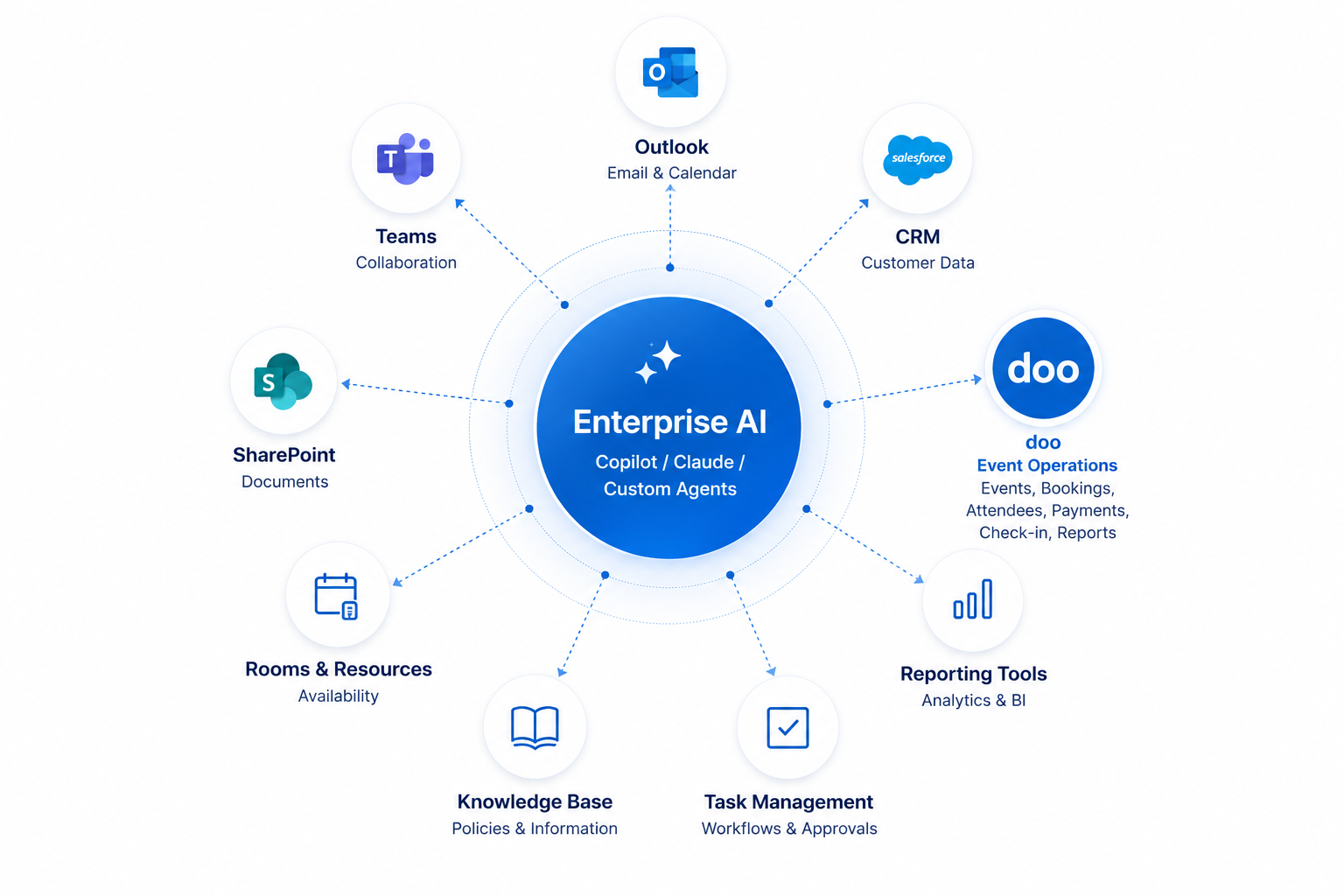
Cross-System Use Cases
When AI combines doo with other enterprise systems, it can automate end-to-end business workflows.
Event Organization
Registration
Attendee Management
Contact Management
USE CASE
Find a suitable time slot for a webinar with Helen Winter and Benjamin Meyer based on their Outlook availability and create the event in doo.
Backstage
Checks Outlook calendars
Identifies overlapping availability
Creates the event in doo and fills in all relevant event data.
RESULT
Webinar is created automatically and can be reviewed and published in doo.
USE CASE
Create an event for our Community Day on Oct 8, generate a suitable event description and agenda based on the meeting notes of the event team and use our standard pictures from the Marketing Folder.
Backstage
Retrieves content from Confluence page
Drafts agenda and event description
Creates the event in doo
RESULT
Event draft is created with complete and consistent content ready for publishing.
USE CASE
Walter Hennings is sick. Find suitable replacement speakers for the workshop on Friday. If none are available, check availability for alternative dates next month.
Backstage
Searches for potential speakers in Notion
Checks the Outlook calendars of potential speakers
Checks Walter Hennings' Outlook for next month
Evaluates available options
Updates or reschedules the event in doo upon user request
RESULT
Suitable replacement options are suggested and can be implemented upon user request.
USE CASE
Register all “Partners” from Hubspot for our Community Day (ticket category VIP).
BACKSTAGE
Retrieves contact records from Hubspot
Adds the contacts as attendees to the desired event in doo
Booking confirmations are automatically sent
RESULT
Respective contacts from the CRM are signed up.
USE CASE
Anna Hausmann via chatbot on event website: “What’s the event about? I would like to register. Are there still tickets available?”
BACKSTAGE
Website chatbot uses event data, FAQs, and ticket information from the doo event to answer the questions
Can register Anna Hausmann as attendee to the doo event upon request after having received all required booking information
RESULT
Attendees receive instant support for their registration without organizer involvement.
USE CASE
Assign each attendee to the appropriate networking session based on the following list and save the information within doo for the name tag.
BACKSTAGE
Matches data from the Excel list with existing attendees
Adds the information to the respective attendee question in doo.
RESULT
Complete attendee information is available and can be printed on the name tags.
USE CASE
Synchronize the attendee data from our workshops in Q1 with Salesforce. Update the data accordingly and create new contacts if necessary and assign them to a list “Workshop attendees Q1/2026)
BACKSTAGE
Sync workshop attendees from doo with Salesforce
Updates or creates contacts
Assigns the contacts them to the dedicated list
RESULT
Actionable recommendations for improving future events are provided.
Security & Privacy
Enterprise AI you can trust

EU Data Privacy by Design
All data hosted on German / EU servers
No US data transfer
ISO 27001 & GDPR compliant
Data Processing Agreement included
Suitable for enterprises and public organizations

Human in the Loop
Critical actions can require human approval
Every AI activity is logged and auditable
AI actions can be paused or rolled back at any time
Compliance teams have full visibility into AI activity

Explainable AI
Every action is traceable
AI only accesses approved data
Explainability reports support internal audits
No hidden “black-box” behavior
BUSINESS VALUE
Why choose doo AI-powered event operations
doo helps organizations bring AI into event operations without replacing existing enterprise systems or compromising governance.
Work with AI you already know
Extend Microsoft Copilot, Claude, and your preferred enterprise AI instead of introducing another platform.
Reduce Event Administration
Automate repetitive event management tasks using natural language.
Enable Attendee Self-Service
Reduce support requests while improving the attendee experience.
Connect Your Event Ecosystem
Bring together doo, CRM, Outlook, reporting tools, and other enterprise systems.
Stay in Control
Every action follows your organization’s governance and permission model.
Turn AI into Action
Move beyond AI conversations and enable operational event workflows.
Less administration. Better events. More value from your existing AI investments.

Future-ready event operations
Get started with AI-powered event operations
Connect doo to your existing AI ecosystem and unlock operational workflows, attendee self-service, and real-time event intelligence through secure MCP-powered integrations.
Guy Hawkins
President of Sales

Guy Hawkins
President of Sales

Guy Hawkins
President of Sales

Guy Hawkins
President of Sales

Guy Hawkins
President of Sales

Guy Hawkins
President of Sales

Guy Hawkins
President of Sales

Guy Hawkins
President of Sales

Guy Hawkins
President of Sales
Guy Hawkins
President of Sales
Guy Hawkins
President of Sales
Guy Hawkins
President of Sales
Guy Hawkins
President of Sales
Guy Hawkins
President of Sales